Showing posts with label Zwift. Show all posts

Tuesday, 22 January 2019

Zwift Racing How-To 101: Racing the KISS Leagues


So you're part of a cycling team who's signed up to race a Zwift KISS Racing League.... but you haven't used Zwift before!? You'll need to cover a few bases first before clipping in and rolling out for your first virtual peloton experience.

Here's my comprehensive resource guide to take you from ZERO to virtual HERO in your pain cave.

Note: Some of these resources have the older Zwift branding and setup screens. The principles and information are all still accurate and relevant today.


1. EQUIPMENT AND SETUP

The KISS Super League will require use of a Smart Trainer as the power source as well as a heart rate monitor for rider verification. Connecting these devices depends on what you're running the Zwift application on.


Bluetooth Smart devices connected to mobile devices or AppleTV pair in much the same way as ANT+. The Zwift application does the paring process.


RACE TIP: Remember to enter your correct user details for the KISS Racing Leagues. This includes Name, age, height, and weight. You should also complete a few rides to familiarise yourself with your equipment and establish power baselines.


2. PAIN CAVE SETUP

Trainer mats, fans, side tables, towels. It's important to have an optimal environment for training and racing indoors. Here's a walk-through of two premium indoor 'caves'.


RACE TIP: Prepare everything well in advance as you'll never know what technical hiccups you may encounter. Indoors you'll likely use twice the number of bidons so prepare more drink than you'll need (any excess can be used to pour over your head... just watch the electronics!)


3. FINDING AND JOINING EVENTS 


RACE TIP: KISS Super League events will all be easily identifiable in the Zwift Companion App. If you're part of the KISS Super League you'll be automatically enrolled in the race events. When you log in you'll see "JOIN EVENT" button in the bottom left of your screen.

DO NOT click the "Leave" button for your race event from within the drop-in screen.  Doing so will prevent you from automatically joining the race.  If you mistakenly click the "Leave" button, you must restart the Zwift application to properly join the KISS Super League race.


4. GROUP RIDE DYNAMICS / DRAFTING 


RACE TIP: The gloves are off when the flag drops in a race! Expect 7-8w/kg starts in ALL RACES. Be prepared when the clock hits GO! A good warm-up is a must. And hold the wheel! Here's more detail on drafting other riders:


5. POWER UPS 


ZwiftInsider has a full and comprehensive list of in-game power ups and how to use them published here: https://zwiftinsider.com/powerups/


6. RACING 

It's up to you and your team how the races play out. Hold the wheel, attack, counter attack. It's bike racing as you know it. 


Good Luck!


Thursday, 7 December 2017

Tour of Bright heads indoors as race cancelled due to severe weather


This time last week saw the cancellation of the 2017 Tour of Bright stage race in the Victorian high country. With severe weather warnings and predictions of up to 300mm of rain, the decision by Alpine CC was a tough one, but was the correct one to make. If anyone has descended Mt Hotham in the wet, you'll agree wholeheartedly with their decision.

Rewinding back a few years to my blog post on the 2008 edition of the Tour of Bright

"Up Rosewhite the pace was gentle and steady. At one point an O2 rider beside me asks how many watts? My reply being "too many", watts and speed up a hill is all dependant on weight, so its of little relevance to anyone other than me. I have a chat to him and find out its Mr CyclingTips himself, Wade Wallace. I've followed his web site for a while, and know of him, but never met him. No better time for introductions than up a climb in a bunch of 90 riders!"

Wade Wallace (founder of CyclingTips) and I both have a fondness for this race. We'd initially crossed paths in the bunch, and in following years we'd both managed to pull on the Yellow jersey in the Masters 1/2/3 and Masters A categories after the final sage.

A post from 2013 on Cycling Tips "Tour of Bright: A Legend Two Decades in the Making" covers the history of this race and some of the successful names in the sport who've pinned a number on at "Bright" over the years.

My last memory of racing Bright were back in 2014, finishing the extremely wet Stage 3 Mt Hotham ascent curled up in a ball on the side of the road after crossing the finish line. I've given the race a wide berth in the following years while trying to block out that experience. I'm sure I'm not alone there, it was quite a memorable stage.


Upon hearing the news the 2017 edition was cancelled, a number of people joked on social media that we shouldn't let all the race preparation go to waste and we should hold a "Virtual Tour of Bright" using Zwift. I liked the idea, however I took it as light humour knowing the effort it would take to make that happen.

Within a few hours the wheels were in motion to make it so. Wade had grabbed this idea and had run (ridden, I guess) with it at full steam!

With the approval of the organisers, sponsors, Zwift, a number of parties, and 62 emails later - The Zwift Bright Brewery Tour of Bright was in place.

Two stages, no official prizes, no entry fees, just log in, clip in, race! I was in! So were over 200 others on the start line of each stage.

– Stage 1: 9am AEDT, 55.7km (London Preztel - Somewhat Hilly)
– Stage 2: 9:30am AEDT, 72.2km (Watopia Pretzel - Really really hilly!)

Was this the official Tour of Bright? No. Was it almost as hard? Yes! A message from Wade after Stage 1 mentioned the word "Brutal" more than once I'm sure. :)

The offical 'virtual' results are over on ZwiftPower if you'd like to see where you ended up or how the riders went in each stage or in the overall GC standings.

ZwiftPower Tour of Bright Results

Stage 1 Wrap Video:


Subscribe to Shane Miller - GPLama on YouTube

Stage 2 Short Video:


Subscribe to Shane Miller - GPLama on YouTube


From an event cancellation to the global collaboration between CyclingTips and Zwift - all in only a few hours to provide riders an opportunity to race their bikes, albeit virtually, and for nothing more than to chase other pixel bike riders on their screens.

This is everything I hoped this new world of connected technology would be. It's not a replacement for the joy and excitement of racing or riding our bikes outside. That'll never be matched indoors. It's an opportunity to still get that heart rate up, to get those legs burning, and to race that rider next to you for 1st or 101st place rather than sitting on the couch looking out the window wishing you were on a bike.


Sunday, 26 November 2017

Zwift on Apple TV - The Full A to Z User Experience


Released just last week, Zwift on AppleTV just might be the game changer people have been waiting for. The AppleTV 4K packs a huge amount of processing power for the 3D rendering required for a solid Zwift experience. In short, nothing comes close in terms of price/performance.

Subscribe to Shane Miller - GPLama on YouTube

Sunday, 28 May 2017

Zwift New Zealand and Australian Tour 2017


This was the third year running Zwift have ventured 'Down Under' before the winter season really kicks in. This time Auckland was added to the itinerary. I was invited along to each of the events to talk tech, smart trainers, Zwift, and all things bike. Here's the wrap of each stop on the tour!


Auckland, NZ. May 22nd 2017 - Allpress


Sydney, Australia. May 24th 2017. Rapha CC


Melbourne, Australia. May 26th 2017. Rapha CC


Subscribe to Shane Miller - GPLama on YouTube


Friday, 27 January 2017

Wahoo Kickr16 / Kickr 2: Unboxing, Building, First Ride.

Wahoo Kickr16 / Kickr 2: Unboxing, Building, First Ride + data analysis.

Here's my review/overview of my new Kickr16/Kickr2. Unboxing, building, stress tests, data review, and some side-by-side comparisons with the original Kickr. If anyone's looking at upgrading or taking the leap to their first smart trainer, this will be worth a watch.


Subscribe to Shane Miller - GPLama on YouTube

Friday, 16 September 2016

Eurobike 2016


Here's a three day video wrap of my recent visit to Eurobike in Germany. I was primarily there to meet with the trainer manufacturers and discuss their upcoming products, here's the footage of things between meetings and throughout the day. Enjoy! 


Subscribe to Shane Miller - GPLama on YouTube


Subscribe to Shane Miller - GPLama on YouTube


Subscribe to Shane Miller - GPLama on YouTube

Tuesday, 26 July 2016

How to do a STEP TEST on ZWIFT p/b HPTek

Thanks to Dr Stephen Lane from HPTek.com.au for taking us through the step test procedure he's put 100s of athletes through over the years.


Subscribe to Shane Miller - GPLama on YouTube

Below is how you can perform this test yourself using Zwift to calculate your MAP and an estimate of your FTP. This is an excellent task to complete prior to doing your 20 minute FTP test.


1. Download this ZWIFT workout file. Right click and save it to your /Documents/Zwift/Workouts folder.

2. Open Zwift and go to SELET WORKOUT (or press 'E' when in the program) and select this workout.


3. Set your FTP to 100W *IMPORTANT*


4. Start the workout and proceed through the 25W steps......


5. As per the video. Record the following information

- Final Completed Stage:___________
- Uncompleted Stage:___________
- Duration of Uncompleted Stage:___________

Example:
- Final Completed Stage: 375W
- Uncompleted Stage: 400W
- Duration of Uncompleted Stage: 120seconds


6. Calculate your MAP with the figures from No.5.

- 120 seconds completed / 150 seconds steps = 0.8
- 0.8 * 25W (increments) = 20W
- Final completed stage + % of uncompleted = 375+20 = 395W


7. Calculate your estimated FTP

- 82.5% of MAP = 395W * 0.825 = 325.8W ESTIMATED FTP


8. Calculate your estimated 20minute FTP value

- 105% of your FTP = 325.8 * 1.05 = 342W


342W is the number this athlete should attempt to hold for their 20 minute FTP test.

Flipping this around - 95% of this figure gives you ~325W and should validate the step test and/or your 20 minute power test, which ever order you did them.

Now keep training, repeat, and check your progress!


Wednesday, 20 July 2016

TACX Neo Road Feel - The Game Changer


The industry is taking note of how their indoor trainers are being used in more immersive environments with VR or game/simulation software.

Wahoo recently released a firmware for the ageing Kickr to bring it up to speed regarding its response to how we're riding it in the new virtual world (specifically acceleration power calculations). After Neo user feedback Tacx also recently updated the Neo for better sprint performance.

With these updates, there's always a chance the next update just might be a game changer ......

This is one. Literally!


Pros:

  • ANT+ and BlueTooth - We're all good there.
  • A more immersive experience - There's some "WOW" factor there, even for people who've used smart trainers for years. 
  • Something to push against, to fight against, something to wake you up from the norm.
  • That rough to smooth 'arhhhhh my butt' feeling after a rough section. Indoors.. who'd have thought that was possible indoors? 
  • Ability for different training modes: Isokinetic and Isotonic - I'll discuss those in another video.
  • Support from Tacx themselves, Zwift, FullGaz, Kinomap, etc..... 


Cons: 

  • Only active during pedal stroke, so dead-spots and coasting are not 'road feel'. That's a limitation of the units, it isn't shaking the ground! 
  • Will it shake Neo too much and cause hardware problems? Unlikely, but time will tell.
  • Customer support may be inundated with - "It rattles....HELP!".... Well yes, yes it does! :)


Future Application:

  • Mario Kart style banana throw... rider in front or behind rides on ICE! Or cobbles! 
  • Training modes 


Summary

  • Is it a game changer? YES. It changes the experience of the game - and THAT's COOL!
  • Could the Kickr do this? Technically I'm not sure. That unit is ageing, ageing well, but still ageing. Also possible issues with the belt and how it measures power.


Head over and subscribe to the channel for updates of new videos.


Wednesday, 6 July 2016

....As Seen on YouTube!


A side step over YouTube has proven to be more successful than I could have thought. I've been tapping away on the blog here for many years, hitting over a few thousand hits with every post. The numbers over on YouTube far exceed that reach - so - that's where a lot of my content will be uploaded.

Detailed reviews and tales will still appear on here, so keep dropping by!


I'm almost on episode 30.... so head over and subscribe to the channel for updates of new videos.


Thursday, 31 March 2016

My Strava Exploded!

Over the last few weeks I've dedicated a lot of my attention to Strava social networking. I've been using Strava for over five years, initially for uploading a few 'fast' rides to now uploading every ride and multi-sport activity I can. I wanted to see if applying the same principals to boost engagement that work with other social working sites would also work with Strava. They did, a lot more than I expected!


"If it's not on Strava, it didn't happen" 


With the introduction of Zwift, my Strava reach grew beyond my hometown of Melbourne, beyond Australia, and to corners of the world I didn't even know about. My use of Strava changed from a personal activity logger to a platform to share activities and locations I've been to, to the world. 

As a competitive cyclist, chasing Personal Bests (PBs) and Segment KOMs is always there, but now the reach is far beyond the competitive side. Uploading activities (with photos!) from Perth, Melbourne, Adelaide, country Victoria, tropical islands off the Queensland coast, even Fiji, have all had great responses from the Strava community.

Here's a few tips I've implemented that boosted my Strava reach far beyond what I thought ever possible in a really short period of time: 

1. Interaction 

Hands down the number one tip is interaction with other Strava users. Kudos epic rides, outstanding efforts, or whoever rode your favourite route today. I found as many riders who uploaded their 235km 'Three Peaks' ride and kudos'ed their efforts. Anyone riding that far in a day deserves it. 

As a Zwift fanatic, I've been interacting with people who've been training hard while clocking up the virtual kilometres. Riding indoors requires a certain level of tenacity, and that always deserves a thumbs up.


2. Ride Names

Sure "Morning Ride" is descriptive, "Best Morning Ride EVER!" is better. Anyone who doesn't kudos a ride called "New Bike Day" doesn't have a beating heart. Everyone loves new bike day. Kudos that. And they better have posted a picture of their new bike... 


3. Photos

Link your Strava to your Instagram via the Social Connections setting (How-to here) and always upload a few snaps via the mobile app once you're done. Sun, rain, hail, or snow, photos bring your activity and location to life on Strava. They become part of the story more than just a map and data. If I'm going somewhere new, I'll look at Strava ride/activity photos before any travel guides. 


4. Do Different!

Take a different route. Go for a PR or a KOM on the way to work. If you're only uploading rides, upload your next walk or hike. As mentioned above, name your activity accordingly and add a photo! 

I've uploaded hundreds of my races over the years on Strava..... so what activity has received the most attention at this point in time? My ride and a KOM on a 12kg flat pedal hybrid hire bike on Magnetic Island (North Queensland, right next to the Great Barrier Reef). That was different.


Using the techniques above my modest follower count has sky rocketed. While follower count is interesting, it's the increased interactions with other Strava users that I've loved. On a recent trip to northern Queensland I was invited on no less than four rides in three different cities all  through my Strava connections. Not to mention the numerous invites to visit the USA as we enter the Australian winter. I'll take everyone up on these offers at some point in the future. 

I'll conclude this post by answering why. 

Everyone has the ability to inspire others. 


Strava is a simple way to promote your chosen sport, to promote your unique location(s), and to inspire others to ride, run, swim, and become active. Globally. I believe that ability and that reach is an amazing concept.

One simple kudos click, a comment, or a follow can make someone's day. Make that today. GO!


Thursday, 4 February 2016

Zwift Racing - How real is it?


It's been 12 months since I first installed Zwift and started chasing friends and strangers around virtual roads in cyberspace. Back in the early beta on Jarvis Island, after only a few rides, I knew there was massive potential in the platform beyond just rolling around for fun and interval training.

ZTR Wednesday - Pre roll-out.

As the Zwift community grew and the group riding dynamics within the game were refined, organised events started popping up all over the place. While we're still on the edge of our seats (saddles?) waiting for the official Zwift event/race module, the Zwift community have already taken things to the next level. Training rides, tempo rides, races catering for all levels, automated results, race reports - It's all happening right now.


Where to find events/rules/details?

The best location at this point is at http://zwiftcalendar.com. It'll show upcoming events in your local timezone with all the rules/details of the specific events listed within each entry. Take note of the route your event will go so you know which one to select when logging in.

A great overview of the ZTR (Zwift Training Race) events and racing in general can be found here: http://www.virtualonlinecycling.com/2015/11/what-is-ztr.html


I've never raced before!

That's not a problem, this is a great way to start out. There's no entry fee, so there's nothing to lose. Just kit up, log in, and join in. Be prepared for some pre-race nerves. After all, you are up against real people who'll want to beat you. Don't let this be a hindrance, it'll prepare you for what you'll go through on race day outside.


Just how "real" is this racing?

Some cyclists will tell you unless you're on a fixed wheel, on the cobbles, in Belgium, in 1974, you're never really racing. Most of us ride indoors to maximize the time we have, and to replicate the efforts we'll be doing outside. From first hand experience, I can confirm the effort required to race in any category on Zwift is EXACTLY what you'll be doing out on the roads... in some cases it'll require more!

Stats from the ZTR-A race on February 3rd 2016 -


302W average for the 48km, NP of around 314. ~4.19w/kg. Depending on what level you're at, those numbers might not mean much.... the key is that I never hit the wind until 1.5km to go! Those numbers were me sitting in the bunch or on a wheel for the majority of the race, on a relatively flat course.

The final 1.5km -


After sitting in the bunch all race with 'fresh legs' (well, in reality, anything but!), the finish was hotly contested over the last two minutes. 541W for 1:53 after just over an hour racing. 7.5w/kg. And you could throw a blanket over the three or four of us at the line it was that close.

How real is the racing? The effort required is VERY REAL! It is the same across all categories, and even with those who get dropped and spend their time chasing back on. When you've got a virtual race number pinned on, the motivation to push yourself will be there.


What really makes "just an ergo session" feel like real racing?

The Effort - As outlined above, the physical effort is on par with real racing, across all categories.

Concentration - Like in a real race, you can never let your guard down. You're always working on your bunch positioning, responding to attacks/accelerations, and there's no time to check your Facebook feed (which I've been known to do the middle of standard ergo rides....) #holdthewheel! :)

The Randomness - No two races are ever the same. One race may have riders pulling Nabali like moves on descents and Froome style attacks up the KOMs... and the next race it might all stay together for a massive bunch kick.

The Racing Experience - Once you've got a few races under your belt, you'll be ready for anything people can throw down. If you want to mix things up, go to the front and dish out some pain! What's the worst that can happen? You drop off, roll in a few minutes down...  then check the calendar for the next race to do it all again! :)


Looking Ahead - The Potential 

Extending beyond just standard bunch races there could be hill climb TTs (on the proposed mountain pass climb), solo TTs, criterium / kermesse races on the newly opened Richmond flat course, multiple group handicap races (like the current Fox and Hound races), the possibilities are endless. If they open up some single-track on mountain bikes, there's a whole new world of opportunity there for dirt racing action!

Given what I've seen and experienced so far, I predict the next 'big thing' will be the race/event module. Automated event joining, neutral roll-out, and instant results will get a lot more people participating and competing against others around the world during their ergo sessions on a daily basis.

Details on exactly what it will include are sketchy, but from past updates we know the team at Zwift are on the ball with what the community wants.


For now. Kit up and #RideOn! Virtual racing is already here and it's going to get bigger!


Further Racing Info/Links:

http://zwiftblog.com/how-to-race-on-zwift-strategy-tips-etiquette-and-more/
http://zwiftnation.com

Thursday, 28 January 2016

Canyon SRAM Zwift Ride with Tiffany Cromwell - Tour Down Under - 2016

For their final trick at the Tour Down Under, Zwift pulled a rabbit out of their hat and announced they've partnered with Canyon-SRAM professional women's team for 2016 and would be using Zwift as a talent ID platform for female racers. The Canyon-SRAM Racing Zwift Academy Project is GO!

More details on the project can be found all over the Internets, and in upcoming press releases.

Like the two events earlier in the week, I was given a backstage pass at Ergo Fitness to come along in person. I took the opportunity to sneak in The Cycling Maven, who was super keen to ask Tiff a few interesting questions for his daily vlog. But not before I got my own 'viewer question' answered during the global live feed....


For more llamas, visit canyonsram.com and teamcanyonsram.com....  And for more info, visit the official team site wmncycling.com.

The Cycling Maven -


Full 1hr Broadcast -


Backstage Pass Pics - 

Hands down the best looking pro bike colour scheme for 2016!


Tiff and Vonm


The team behind the scenes working hard.

Cycling Maven - He can't look any more excited! :)


Cheers R. Wilson for carrying the theme. #llamas! 


Wednesday, 20 January 2016

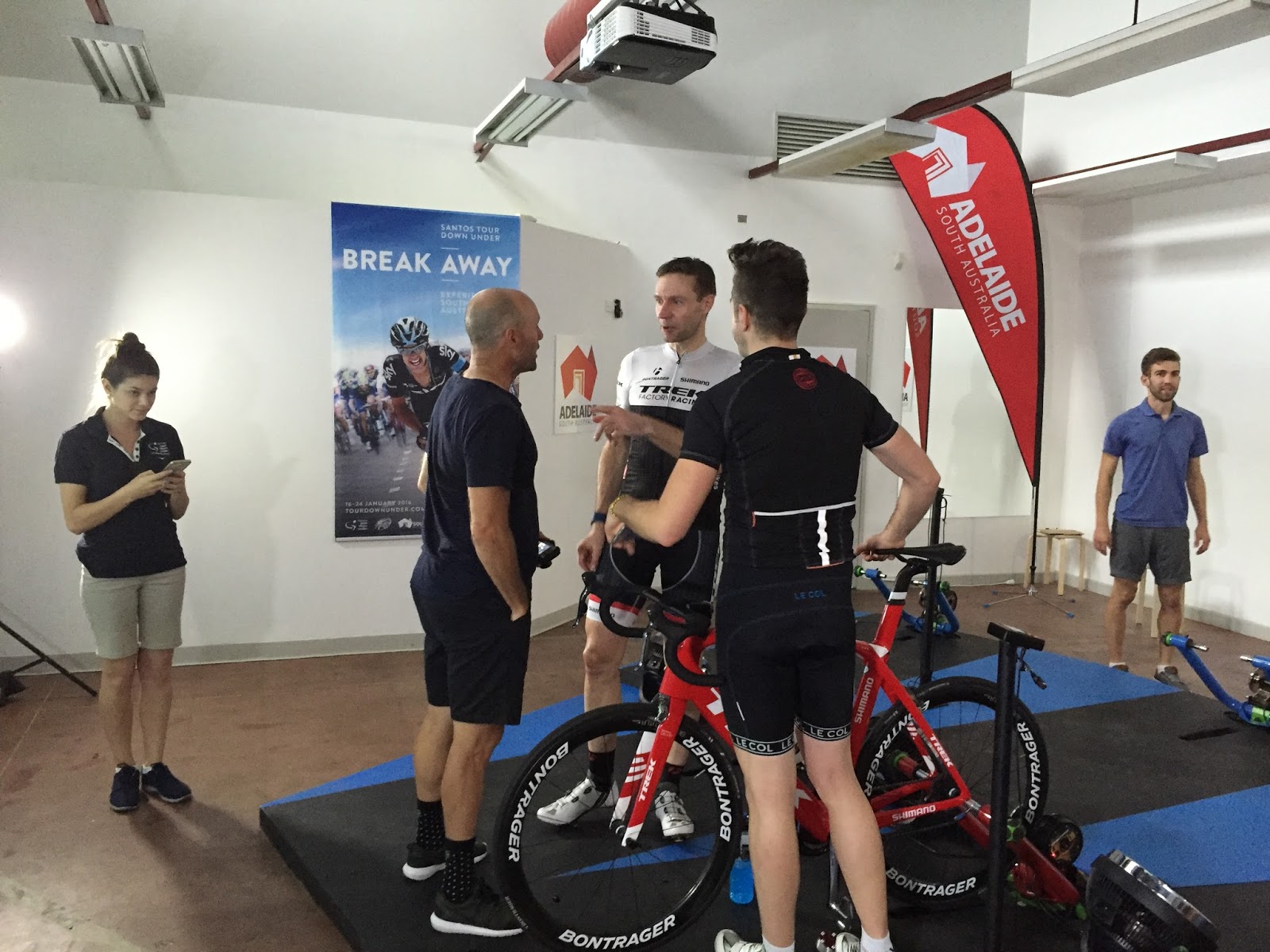
Jens Voigt Zwift Ride - Tour Down Under - Jan 19th 2016

Hot on the heels of the Team Dimension Data Zwift event here at the Tour Down Under, the team at Zwift lined up crowd favourite Jens Voigt for a world-wide group ride on Watopia.

A professional media company had taken control of the broadcast on the Zwift YouTube Live channel. It was a pretty impressive set up.

Jens was a true professional - Answering questions from all angles while cranking out the watts with everyone who'd joined the ride.

It'll be "all systems go" again tomorrow for the Canyon//SRAM women's team event.... along with a pretty huge announcement on that front during the broadcast. See the Zwift Facebook page for details/times.


Here's some of the back stage action!


Wednesday, 30 December 2015

Alienware Alpha i3 - Quick Upgrades (and GPU overclock!)


My pain-cave PC is an Alienware Alpha i3. An all-in-one mini desktop computer with enough features to run everything I need right out of the box. I went with the lowest spec model with plans to upgrade both the RAM and HDD in the near future. 

The future is now! 

Having taken advantage of the Windows 8.1 to Windows 10 upgrade from Microsoft, I chose to bump the RAM from 4GB up to 12GB, and the 5400rpm HDD to a SSD (solid state drive).

Here is the quick rundown of how I went about the upgrade - 

RAM Upgrade

The base model i3 comes with one 4GB stick of DDR3L 1600Mhz Low Voltage RAM. L is the important part, you can't mix standard voltage DDR3 (1.5V) and Low Voltage DDR3 (1.25-1.35V). You can run either in the Alpha, just not both at the same time. As I was keeping the stock 4GB, I went for a matching 8GB DD3L to boost my Alpha to 12GB.

A quick price check online indicated an 8GB stick would set me back around AU$65. The first store I went into in Preston felt more like I'd walked into some seedy bro's bedroom while he was looking at the latest Zoo magazine. I double checked the sign on the door, yes, this was a computer store. I got strange looks when asking for a stick of 8GB DDR3LRAM, and he was both unwilling and, according to him, unable to help me. I kind of got the feeling that the store was a front for something else other than computers. Dodgy.

Further up the street I had more luck. The store had a stick in stock! My 8GB stick came with no packaging, no bag, and a complete lack of service. I handed over AU$80 for what would have cost me a lot less online. 

Anyhow, my tip - Avoid the mistakes I made by stumbling my way into a drug den / computer store then getting ripped off at the counter. Order online


My i3 Alpha now looking nervous.

Flip it - Only four screws to unleash the beast within. 


Pop the CPU cover to access the RAM

The stock 4GB DDR3L 1600Mhz Low Voltage stick

A matching DD3L 1600Mhz Low Voltage 8GB stick.

Installed - 12GB ready to RAMble! 

That's it. Just boot up and away you go!


HDD to SSD

While more RAM is nice to have, the system really wasn't hitting any performance limiters with only 4GB, so I went with the upgrade to SSD too.

The i3 Alpha has a generous 500GB drive, albeit only spinning at a lowly 5400rpm. This IS a performance limiter for the system. I had a spare 128GB SSD from a previous project that would go straight in, well, it did after messing about with partitioning software.


It was as if they expected you to upgrade this... easy to get to.


Copy copy, partition, copy copy - Thanks to Reflect Free.

After some partitioning magic (oh yes, the old-school will get that reference), it was a case of throwing it all back together for a #RideOn! 

Side note - 128GB is more than enough for my pain-cave PC. Most content is streamed, and now I have a 500GB portable HDD I can connect via USB thanks to this upgrade. The Alpha with Windows 10, Zwift, and a few other tools installed takes up around 40GB of space.


Conclusion 

The RAM upgrade will assist when multi-tasking ergo software, music playlists, and the like. The must-do is the SSD upgrade. It is BLINDINGLY FAST. Crazy fast. Less than 5 seconds to boot into Windows 10, and a lot snappier doing everything else. As for Zwift, the frame rates are still the same, it just takes less time to get it all up and running.


*March 2016 Update!*

GPU Overclock (Use at your own risk!)

Using MSI Afterburner and 'conservative' GPU overclock settings of 135/507 (core/memory), I gained a measurable 12% 3D performance increase on the Alienware Alpha i3. 3456->3871 with PassMark. While you're tinkering, switch off v-sync in the GeForce advanced settings too.

For best results ensure your Alpha has good airflow around it. And as above, use this at your own risk as it could cause system instability.